JazzLink Studio MUSIC SERVICES
Open App
Services BrassMatch Setlist Attendance Screens FAQ Contact
Open App

ATTENDANCE SCHEDULER · AVAILABLE

Collect everyone's availability, then pick the best date.

Attendance Scheduler is a scheduling and attendance tool for groups. The administrator sets up the candidate dates and sends each member a response URL that needs no login — members answer Yes, Maybe or No, and the totals build themselves. It makes life easier for wind bands, big bands, choirs, hobby clubs, classes and community groups.

Officially released. Start with the Free plan.

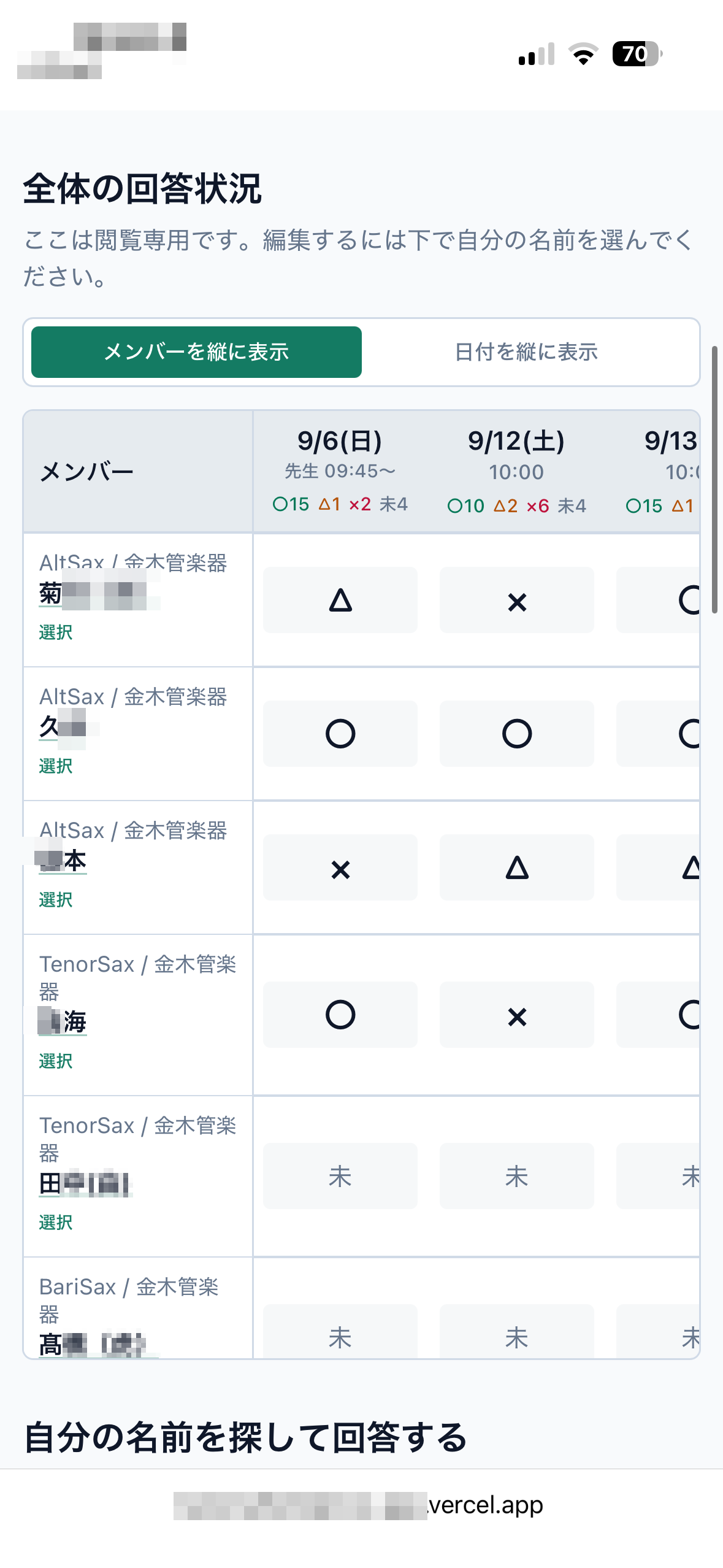
Overall response screen. Yes, Maybe, No and not-yet-answered counts are totalled for each candidate date, with every member's reply listed
Overall responses
Overall responses (members down the side)
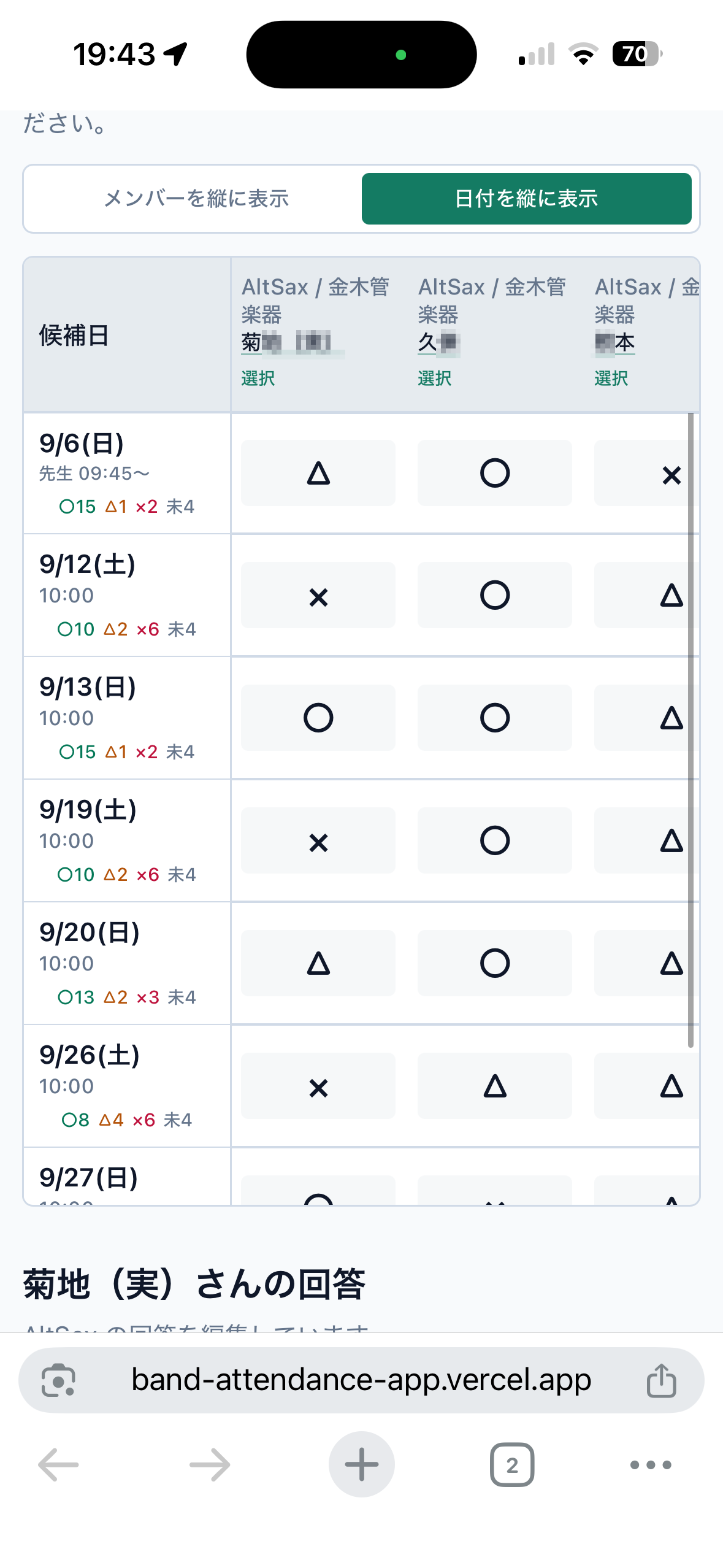
Response screen with the dates running down the side, so you can scan the totals per candidate date and choose the day that gathers the most people
Dates down the side
Dates down the side (switch with one tap)

These are real screens. Design and wording may change. The screenshots shown here use the Japanese interface. The app supports multiple display languages, including English.

PROBLEM

Still chasing attendance replies through the group chat?

Replies scroll away

Important answers get buried under everything else in the thread.

You can't tell who hasn't answered

Working out who is still missing takes real effort.

Building the tally table is a chore

You rebuild the same summary by hand every single time.

The best date is hard to spot

Comparing several candidate dates is harder than it should be.

You want a view by part or group

Headcounts per section aren't visible at a glance.

No logins, but keep the history

You don't want to burden members, yet you want past attendance on record.

FEATURES

What Attendance Scheduler does

Set up candidate dates together

Add several candidate dates to one event.

Answers without a login

Members reply straight from their own URL.

Yes / Maybe / No and undecided, tallied

Headcounts per date are totalled automatically.

Check by group and by part

See attendance section by section.

Spot who hasn't answered

See at a glance who is still missing.

Copy the response URL to share

Copy the URL and send it by chat or email.

Reissue a member URL

Disable the old URL and switch to a new one.

CSV import / export

Export on every plan, including Free. Import on Standard and Premium.

HOW IT WORKS

Simple to run

  1. 1

    The administrator creates a group

    Set one up for your ensemble, band or class.

  2. 2

    Add the members

    Keep names, parts and sections in one roster.

  3. 3

    Create the event and its candidate dates

    Give a rehearsal or a concert several dates to choose from.

  4. 4

    Share the response URLs

    Send each member their own URL by chat or email.

  5. 5

    Members answer Yes, Maybe or No

    No login needed — they reply straight from the URL they received.

  6. 6

    The administrator decides the date

    You judge from the totals. The app never decides a date for you.

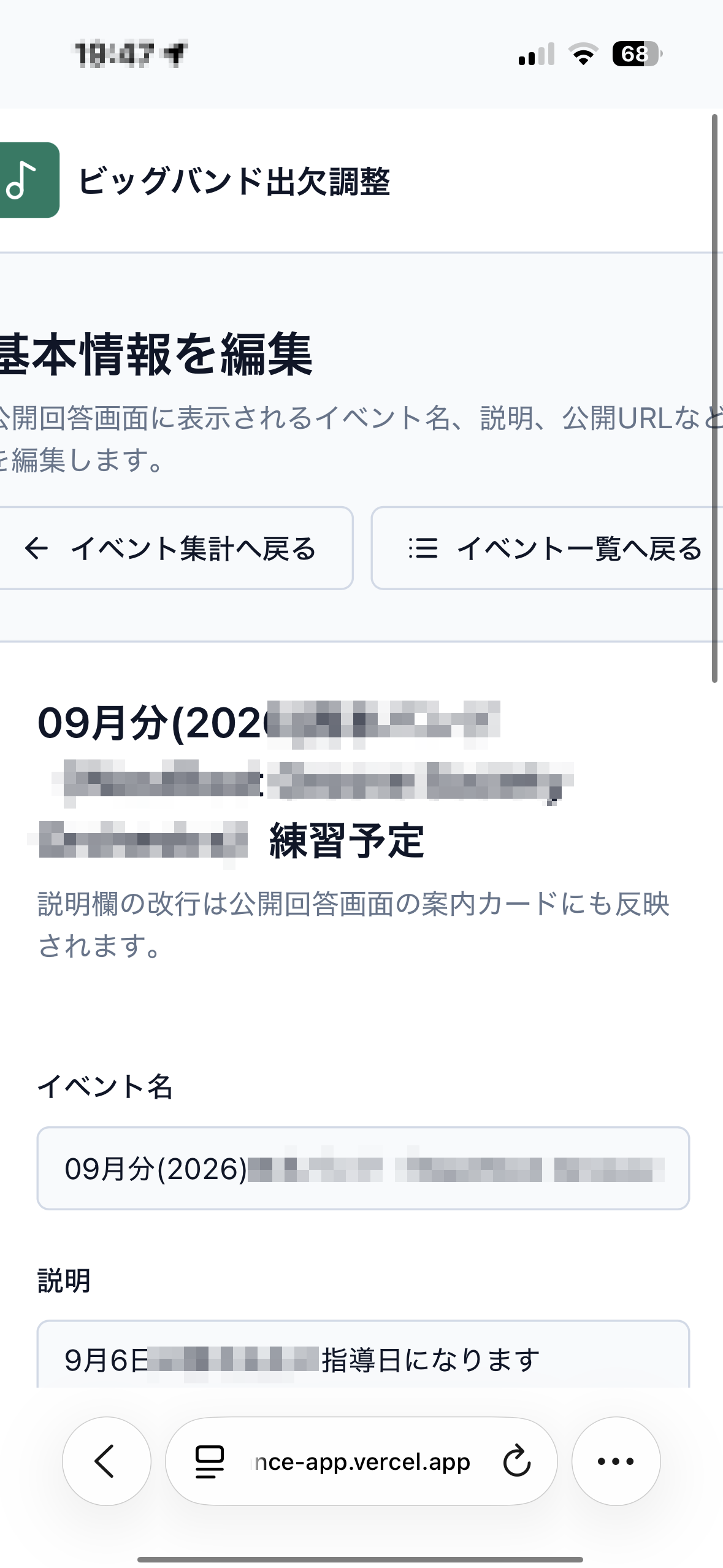
Event editing screen, where you enter the event name and description and set the candidate dates you want attendance for
Event setup
STEP 3
Set the event and its dates
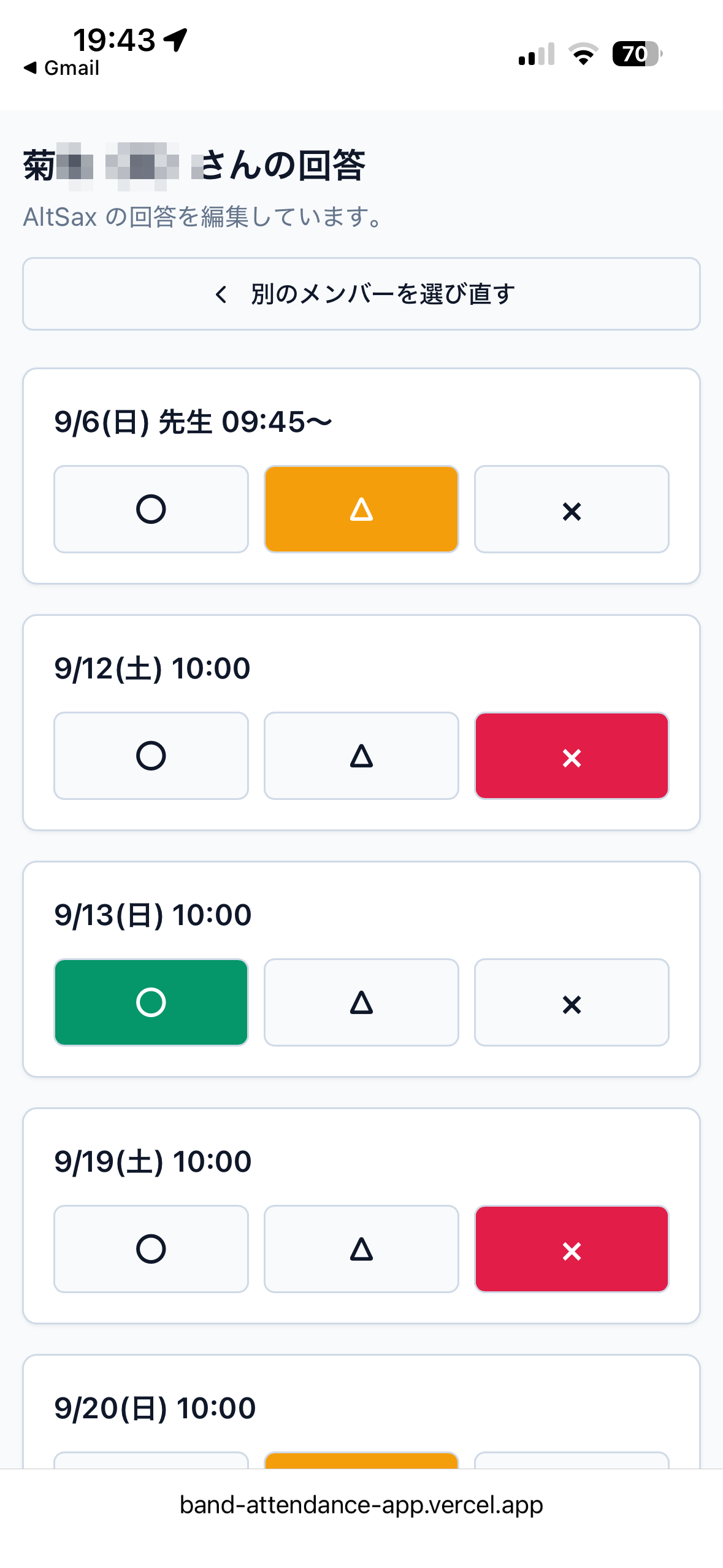
Member response screen, where each candidate date has Yes, Maybe and No buttons to tap
Member reply
STEP 5
A quick Yes, Maybe or No
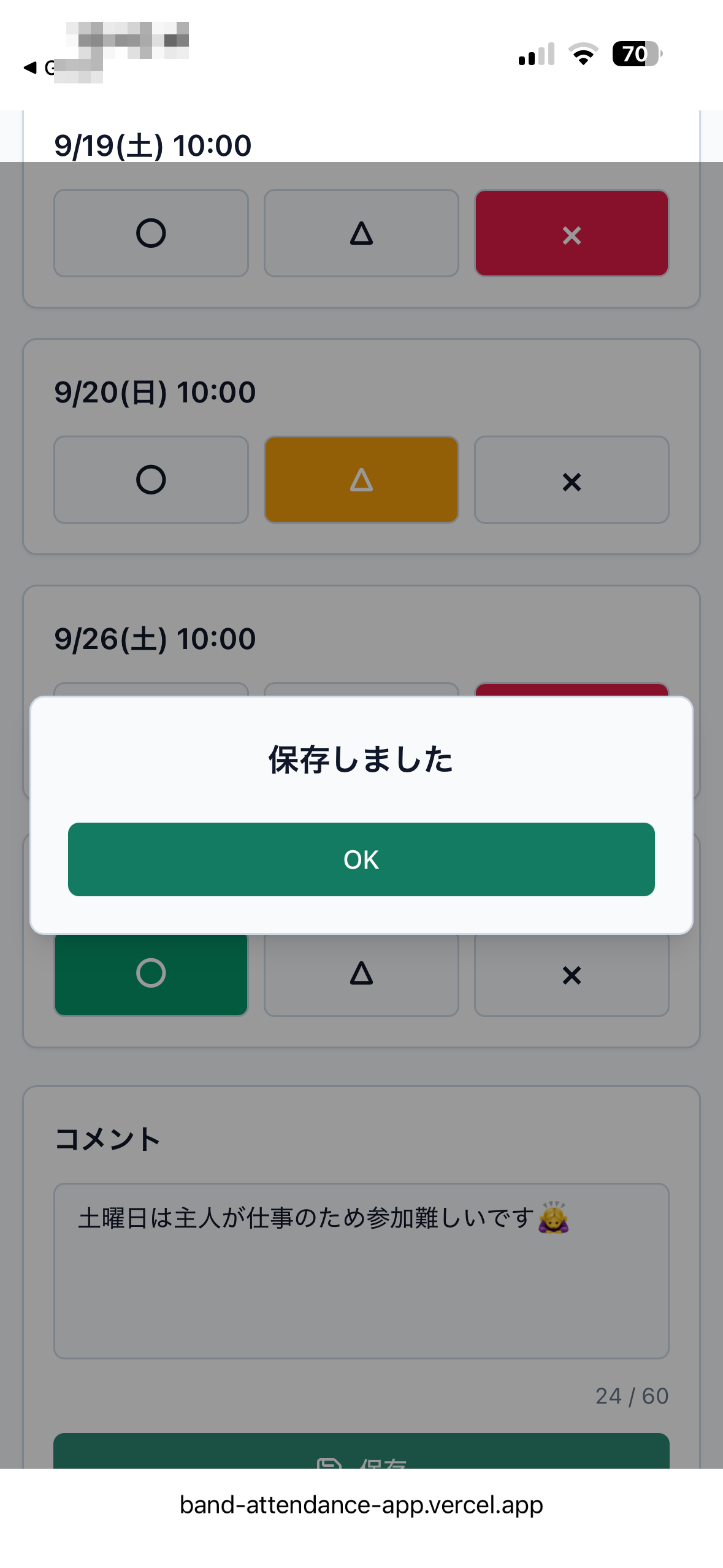
Save confirmation dialog showing that the response has been recorded
Saved
Save the answer
and you're done

These are real screens.

USE CASES

A good fit for groups like these

Wind bands
Big bands
Choirs
Ensembles
Music schools
PTA & community groups
Sports schools
Adult hobby clubs

SAFETY

Easy on your members, careful with access

  • Members never log in. They are not asked to create an account.
  • Personal URLs that are hard to guess. Response pages are issued with random strings.
  • Member URLs can be reissued. Switch to a fresh URL whenever you need to.
  • Old URLs can be disabled. Stop using the previous URL and switch to a new one.
  • The admin screens require a login. Only administrators handle the roster and the totals.
  • Response pages stay out of search. Public and response pages are designed not to be indexed by search engines.
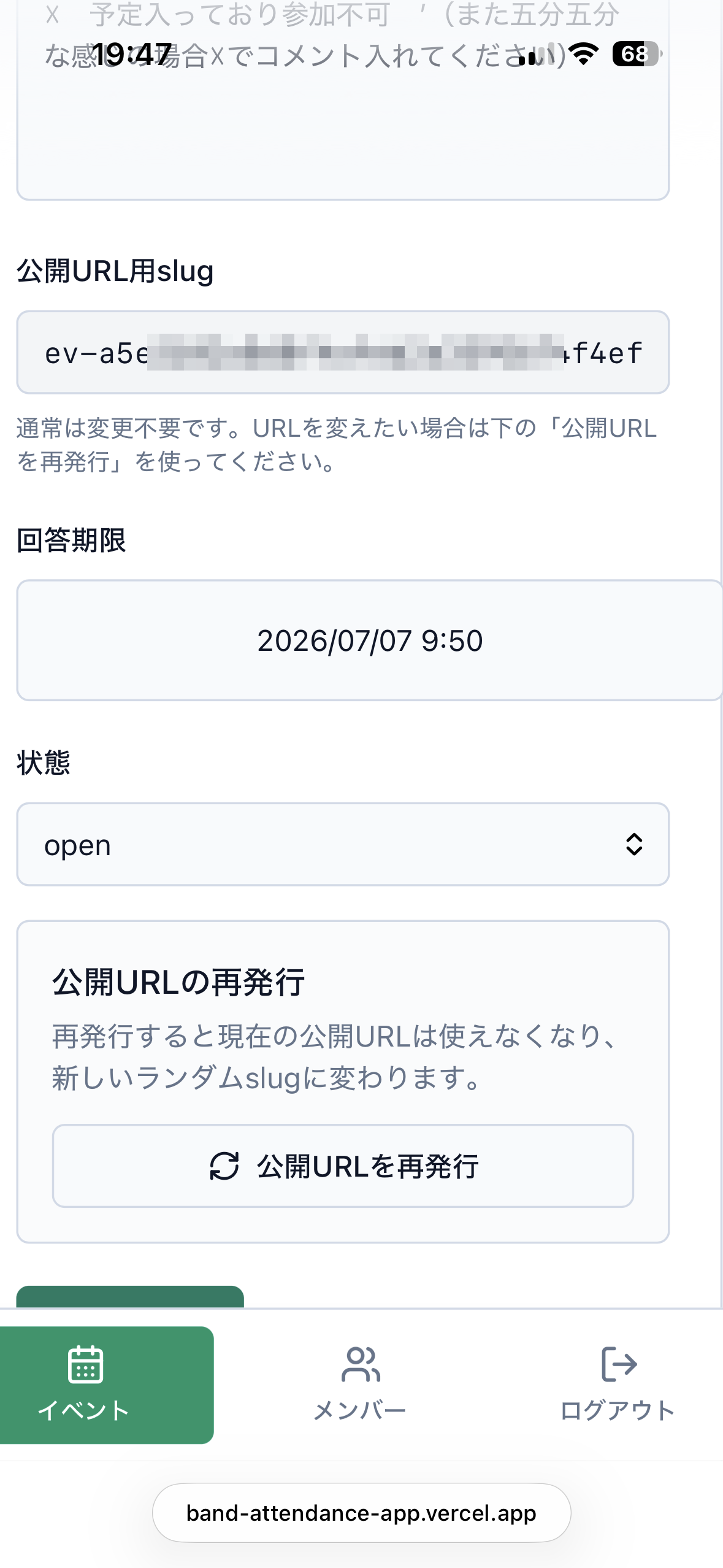
Public URL reissue screen. Reissuing the randomly generated URL makes the old one stop working
Reissue the public URL
Reissue a random, hard-to-guess URL and disable the old one (real screen)

SCREENS

A look at the real screens

These are real screens. Design and wording may change.

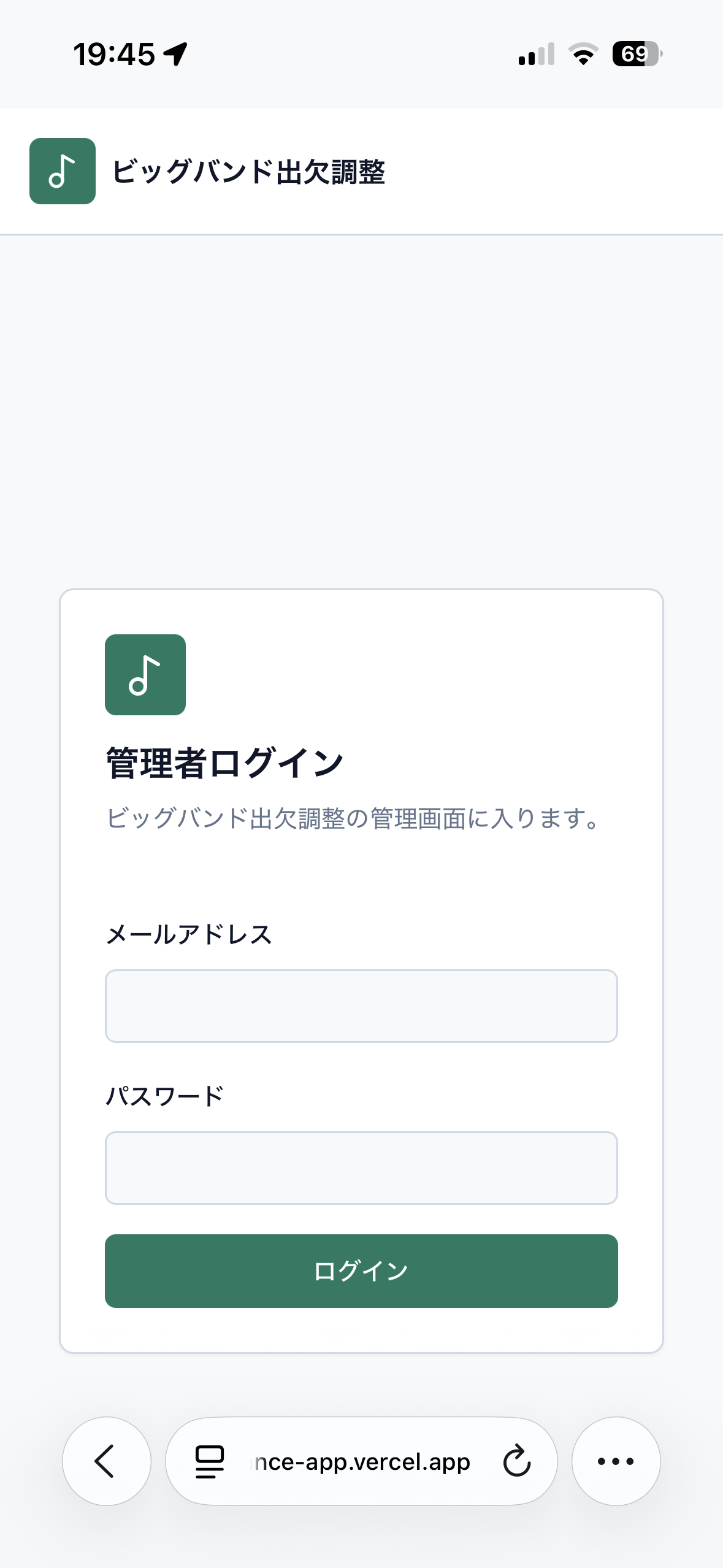
Administrator login screen, where you sign in to the admin area with an email address and password
Administrator login

Administrator login

The admin area that holds the roster and the totals always requires a login.

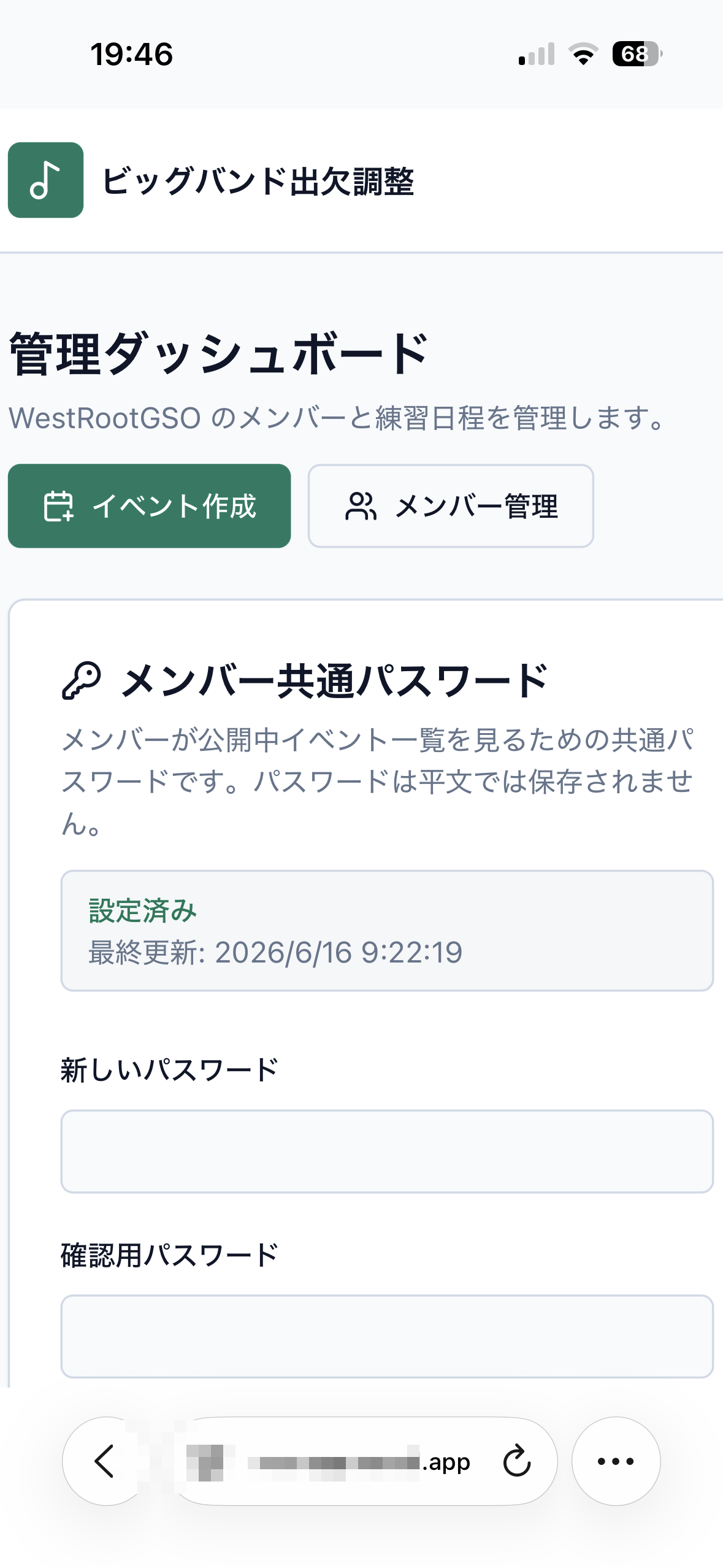
Admin dashboard, where you set the shared password members use to view the event list
Admin dashboard

Admin dashboard

Manage things like the shared member password in one place.

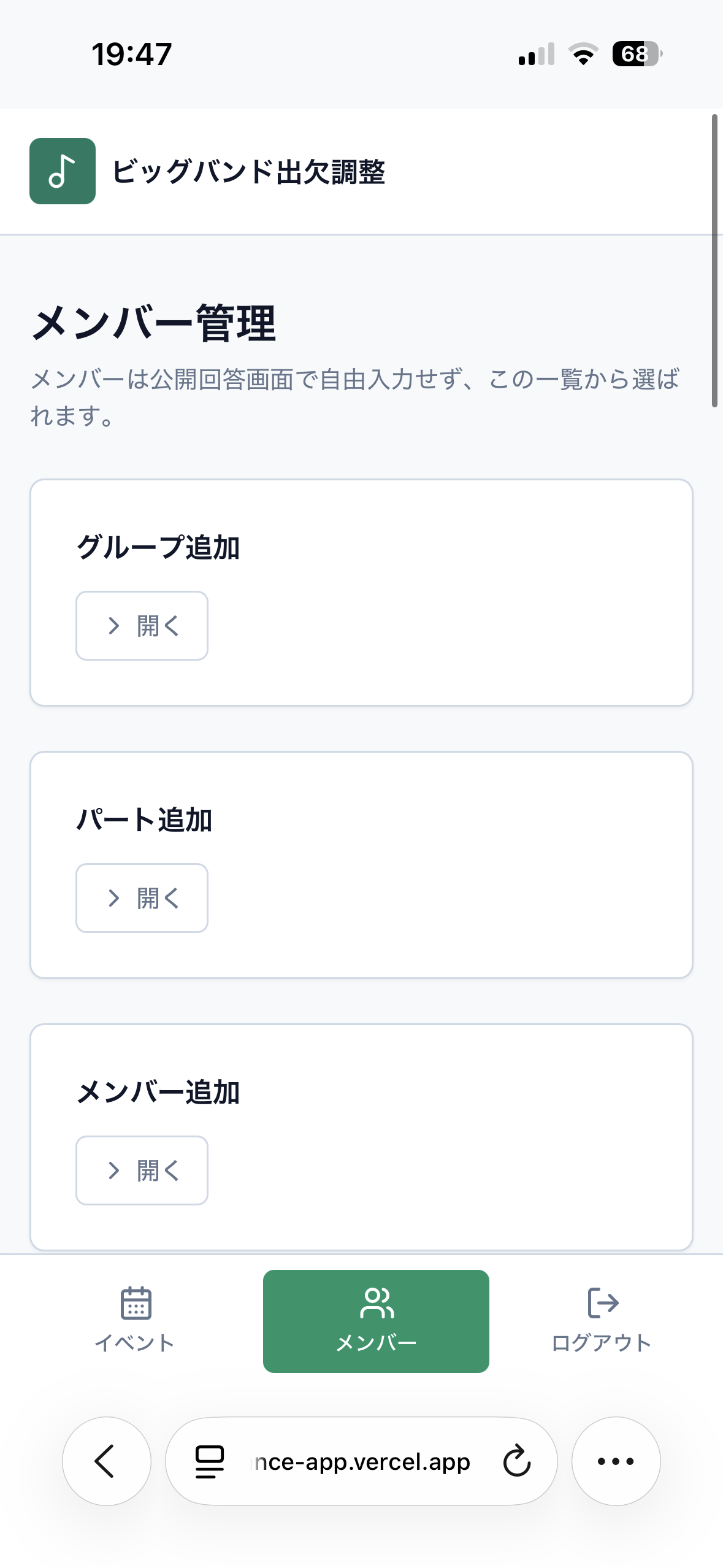
Member management screen, where members are added and organised across two levels: group and part
Member management

Member management

Organise the roster across two levels: group and part.

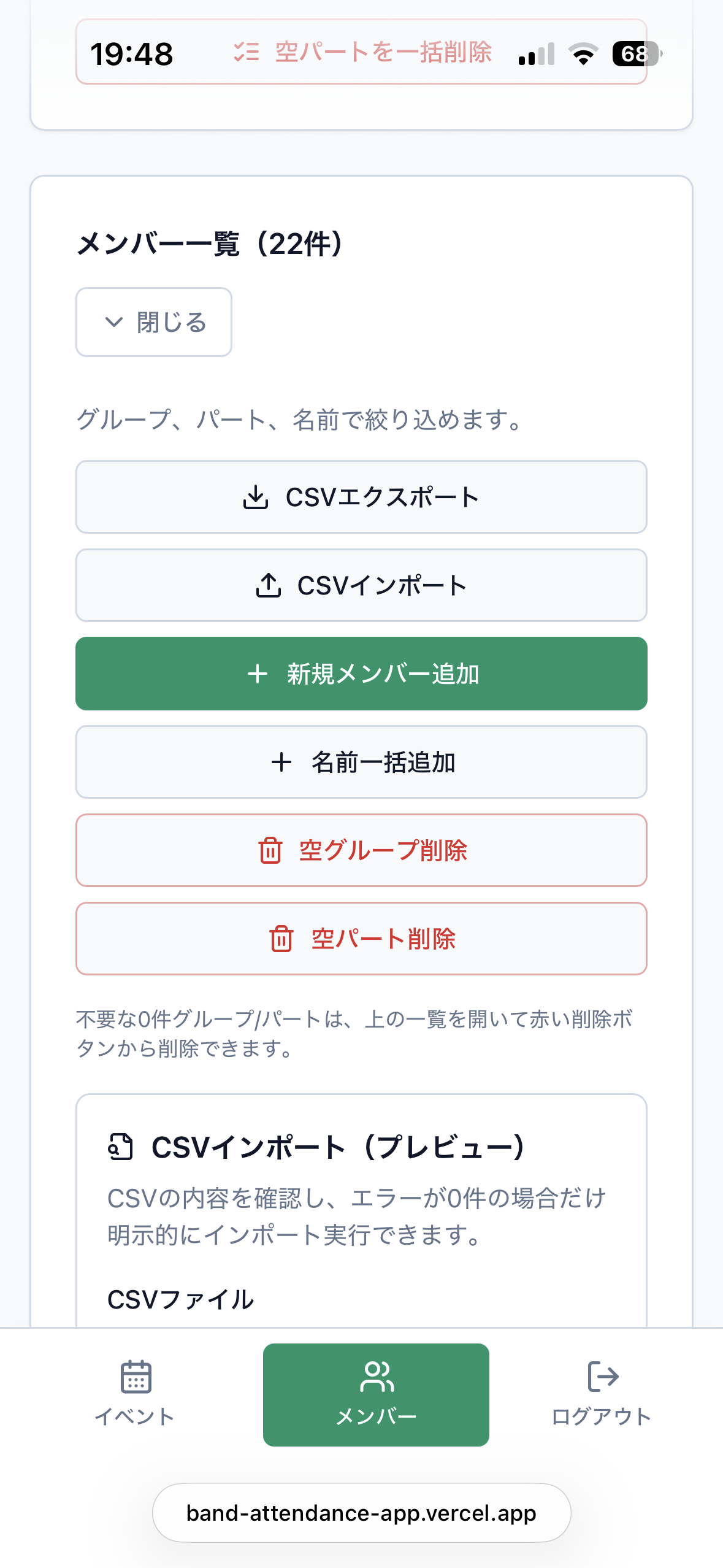
Member list screen with buttons for CSV export, CSV import and adding a new member
Member list and CSV

Member list and CSV

Export on every plan, including Free. Import on Standard and Premium.

PRICING

Plans and pricing

You can also check the latest plan details on the pricing page inside the app.

Free

¥0 / month

For small bands and small clubs, and for anyone who wants to try it first.

  • 1 group
  • Up to 25 members per group
  • Up to 3 events per group
  • 180-day data retention
  • Candidate dates up to 720 days ahead
Start for free
Recommended

Standard

¥300 / month

For running several groups, or for the long haul.

  • 3 groups
  • Up to 60 members per group
  • Roughly 180 members in total
  • Up to 30 events per group
  • 1-year data retention
Open App

Premium

¥1,500 / month

For multiple organisations, schools and larger operations.

  • 30 groups
  • Up to 120 members per group
  • Roughly 3,600 members in total
  • Up to 100 events per group
  • 2-year data retention
Open App

* Plan details may change without notice.

* The data retention period is counted from the date the event was created.

* Setting candidate dates far in the future does not extend the retention period.

NOW AVAILABLE

Officially released.

Attendance Scheduler is officially released, and you can start on the Free plan straight away. CSV export is available on every plan, including Free. CSV import is available on the Standard and Premium plans. The paid plans also cover running multiple groups and longer data retention.

Start with the Free plan — sign up and it is ready to use as it is.

RELATED

Related services

FAQ

Frequently asked questions

Can I start using it right away?+

Yes. Attendance Scheduler is officially released. You can start on the Free plan right now at attendance.jazzmatch.jp.

Is there a free plan?+

Yes. Smaller groups can use the Free plan at ¥0 per month. It covers 1 group, up to 25 members, up to 3 events and 180 days of data retention.

Do members have to log in?+

No. Members never log in. They open the personal response URL the administrator sends them and answer Yes, Maybe or No from there. Members are never asked to create an account.

Can I compare several candidate dates?+

Yes. You can add several candidate dates to a single event, and the administrator decides which date works best by looking at the replies that come in. The app never picks a date on its own.

Can groups outside music use it?+

Yes. It is not limited to wind bands, choirs and other music groups. It is designed for any group that needs to collect members' availability, including hobby clubs, classes, PTA and community activities and sports schools.

How many people can I have on the Free plan?+

The Free plan allows up to 25 members per group. If you need a larger roster or more than one group, consider Standard or Premium.

Can anyone who knows the URL reply?+

Response URLs use random strings that are hard to guess. Whenever you need to, you can reissue the URL, disable the old one and switch to the new URL.

How long is my data kept?+

Retention depends on the plan: 180 days on Free, 1 year on Standard and 2 years on Premium. The retention period is counted from the date the event was created.

Do you support CSV?+

Yes. CSV export of your member list is available on every plan, including Free. CSV import is available on the Standard and Premium plans.

Are there paid plans?+

Yes. Standard is ¥300 per month and Premium is ¥1,500 per month. They cover running several groups, larger rosters and longer data retention. You can check the latest details on the pricing page inside the app.